Early access preview · collectors welcome
Your library. On a shelf. Again.
A web catalog for people who collect books, movies, and games to keep. Browse by cover, import what you already own, export anytime. Private by default.
There is a working demo you can click through right now, no signup required. The waitlist is how you get into the preview behind it, and how you shape what we build next.
Survey plus email. We will reach out when early access opens.
 Explore the demo
Coming from Delicious Library?
Cover browse, on the web
If you catalogued books, movies, and games in DL, you already know the feeling we are aiming for: covers facing out, one home for mixed media, a catalog that respects ownership. We are not cloning the Mac app. Here is what the preview offers today, and what is still on the list.
Still on Delicious Library 3?
Export XML from the Mac app and import it in Settings. No CSV conversion required. Step-by-step guide on the blog.
How to import your exportIf you are migrating from Delicious Library
What Delicious Library had, and what The Big Bookcase offers today.
- In the demo
Delicious Library had
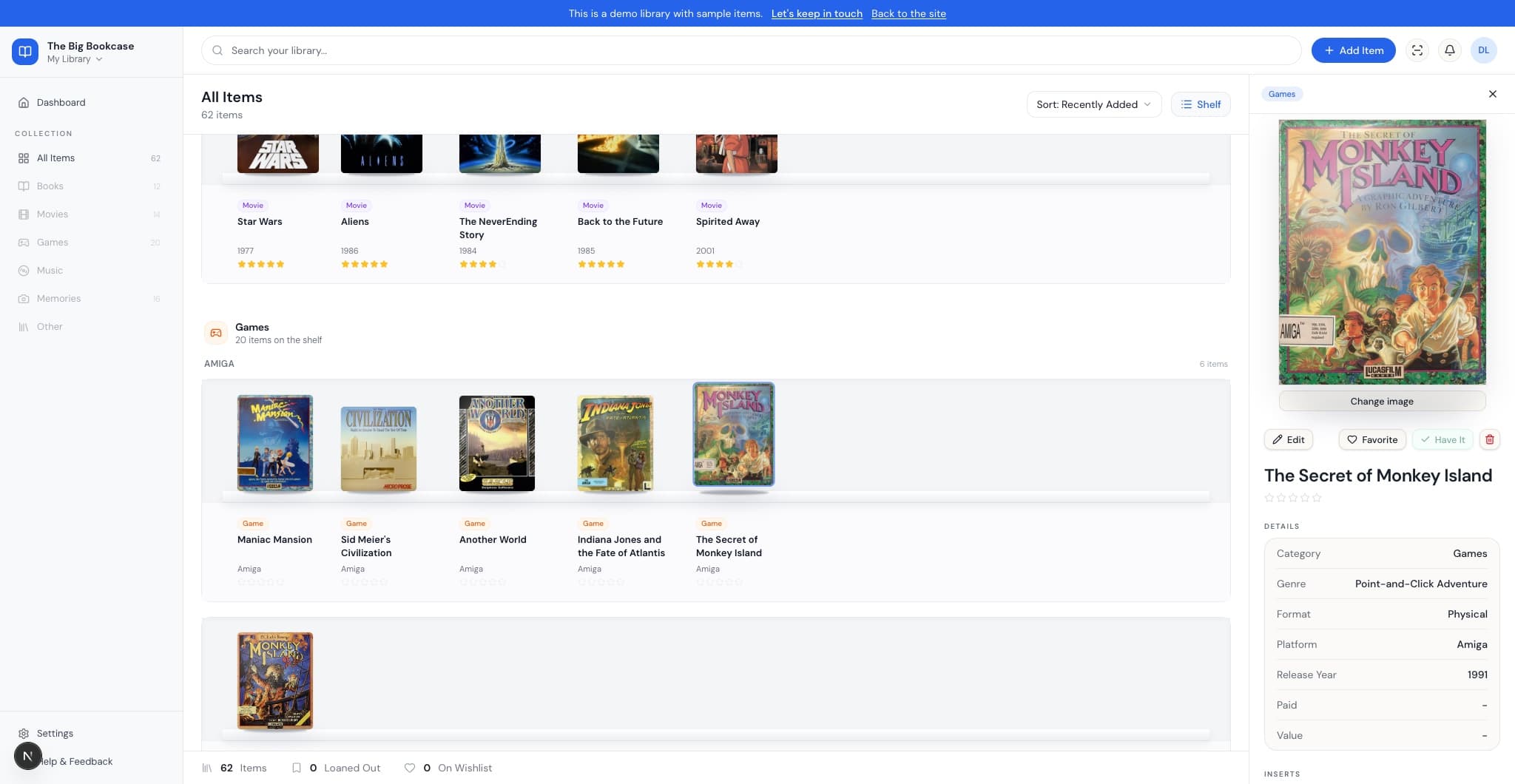
Covers on a wooden shelf. Click one for details.
The Big Bookcase offers
Cover-first shelf and grid, with an inspector for each title. Browse it in the demo.
- In the demo
Delicious Library had
Books, movies, and games in one library.
The Big Bookcase offers
Same mix: one catalog with sections per media type, physical and digital side by side.
- Building
Delicious Library had
Your catalog stored on the Mac. Export when you needed a backup.
The Big Bookcase offers
Building DL XML import, plus Goodreads, Calibre, and Steam, with CSV and media ZIP export so you are never locked in.
- Building
Delicious Library had
Lending, notes, and favorites on each item.
The Big Bookcase offers
Loans, notes, and favorites in the inspector.
- Building
Delicious Library had
Scan barcodes with the iSight camera.
The Big Bookcase offers
Camera barcode scan is on the build list.
- In the demo
Delicious Library had
Mac-only desktop app.
The Big Bookcase offers
Web catalog in any modern browser. No Mac required.
For people who collect to keep
Goodreads tracks what you read. Letterboxd tracks what you watch. Steam is a grid of icons. None of them catalog what you own. Whether your collection lives on a shelf or on a hard drive, you deserve covers out, curated, personal.
In the preview app
Memories: the keepsakes that aren't books, movies, or games
Action figures, retro consoles, ticket stubs, posters, the stuff you kept for the story behind it, not to read or watch. Memories gives each one its own free-standing cutout on the shelf, sized to the real object, tagged and grouped next to everything else you own.
Photograph it, pick a kind and a size, add a note if you want one, and it takes its place on the shelf. No cover, no case, just the object.
See Memories in the demoFigures & toys
Consoles & handhelds
Tickets & props
Autographs
Apparel & pins
Photos & prints

About the project
Built independently, in the open
The Big Bookcase is a web catalog built by collectors who wanted a proper shelf for the stuff they keep: editions on the wall, discs in the cabinet, games on the drive. We are not affiliated with Delicious Monster or Delicious Library. If that Mac app was your reference point, you will recognize the cover-first browse. This is our own take on it for 2026.
There is a working demo you can browse right now, no signup needed, and a longer plan we publish openly on the roadmap. A fuller preview app sits behind a password gate while we finish it; barcode scan, per-user accounts, and opt-in public shelves are on the way. We ship in public and read every waitlist answer.
We build with AI coding assistants and say so upfront. That is separate from your data: your catalog and survey answers stay with this service, not sold for model training.
Guides for collectors
Essays on cataloging, import paths, and what we are building.
Product roadmap
What we are building
What you can try in the public demo today, what we are building now, and what comes after. Updated July 9, 2026.
Try it in the demo
Digital shelf
Ebooks and digital games sit in their own Digital subsection beside the physical shelves. The demo now stocks 20 public-domain classics from Project Gutenberg.
Memories
Catalog keepsakes that aren't books, movies, or games: figures, consoles, tickets, autographs, and more. Each one renders as a free-standing cutout on the shelf, sized to the real object.
Games in the library
Retro and modern games on their own shelf, with real box art, grouped by platform.
Building now
Library import
Import from CSV (Goodreads, Calibre, or our template), Steam, or a Delicious Library XML export. Preview matches, skip duplicates, and bulk-add from Settings.
Library export
Download your catalog as CSV or a ZIP with cover art, backs, and inserts, so you are never locked in.
Questions
The short version.
What is The Big Bookcase?
The Big Bookcase is a web catalog for books, movies, and games you own: physical, digital, or both. Browse by cover, edit metadata in an inspector, import from CSV or Steam, and export your library anytime. If you used Delicious Library on the Mac, the shelf-and-cover feeling will feel familiar. We are an independent project, not an official sequel.
Who is it for?
Collectors who care about owning things, not just consuming them. Books, Blu-rays, games, comics, eBooks, Steam libraries, and more. Goodreads tracks reading. Letterboxd tracks watching. Neither is built for the edition on your shelf or the game in your library. We are.
Is my shelf public?
Only if you want it to be. Your collection is private by default. You can keep everything to yourself, share part of it, or make a shelf fully public. When you're ready to sell something or give a physical item away, we plan a simple way to announce that without exposing more than you choose.
Can I use it today?
Not yet. There's a working preview behind a password gate, but we're not ready for everyone. Get in touch, tell us what you collect, and we'll reach out as early access opens. Pricing is still TBD; we'll talk to collectors first about what feels fair.
Can I import my Delicious Library catalog?
Yes, in the preview app. Export XML from Delicious Library on your Mac, then open Settings → Import from CSV or Steam → Choose CSV or XML file. Goodreads, Calibre, and Steam imports use the same dialog. See our export and import guide for step-by-step instructions.
Can I export a report for insurance?
Not yet, but it's the idea that comes up most once collectors picture a shelf lost to fire or flood. If a printable report bundling photos, values, and condition for insurance or estate purposes would matter to you, tell us on the waitlist. It would move up the list fast.
How is this built?
Openly, and with a lot of AI help. Coding assistants are central to how we design, write, and ship this site and the app. That is separate from your data: waitlist answers and library entries are stored for this service, not sold for model training. The preview supports Delicious Library XML, CSV, and Steam import plus CSV and ZIP export so your library stays portable.
Shape what we build next
Two minutes: what you collect, what you use today, and what would make you move your library here. Then your email so we can stay in touch.
Let's keep in touch